

Show More Button
On grid layouts you can show the first few images and hide the rest behind a button. This sub-tab sets that button's wording and look.
Where to find it: FluentCart → Product Gallery → Gallery → Show More Button (admin.php?page=smart-product-gallery#gallery/show_more_button)
When this sub-tab appears
The sidebar only shows Show More Button when both of these are set on the General tab:
- Gallery Layout is Tiles, Hierarchy Grid or Modern Grid.
- Visible Gallery Items is Specific.
These settings only take effect when Gallery Expansion is Show More Button. If it's set to Scroll, the sub-tab still appears, but the gallery uses a scrolling box instead of a button.
When there are more images than Number of Items, a button appears below the grid. Clicking it reveals the rest of the images and changes its label to the collapse text. Clicking again hides them. If a product has no more images than Number of Items, the button doesn't appear.
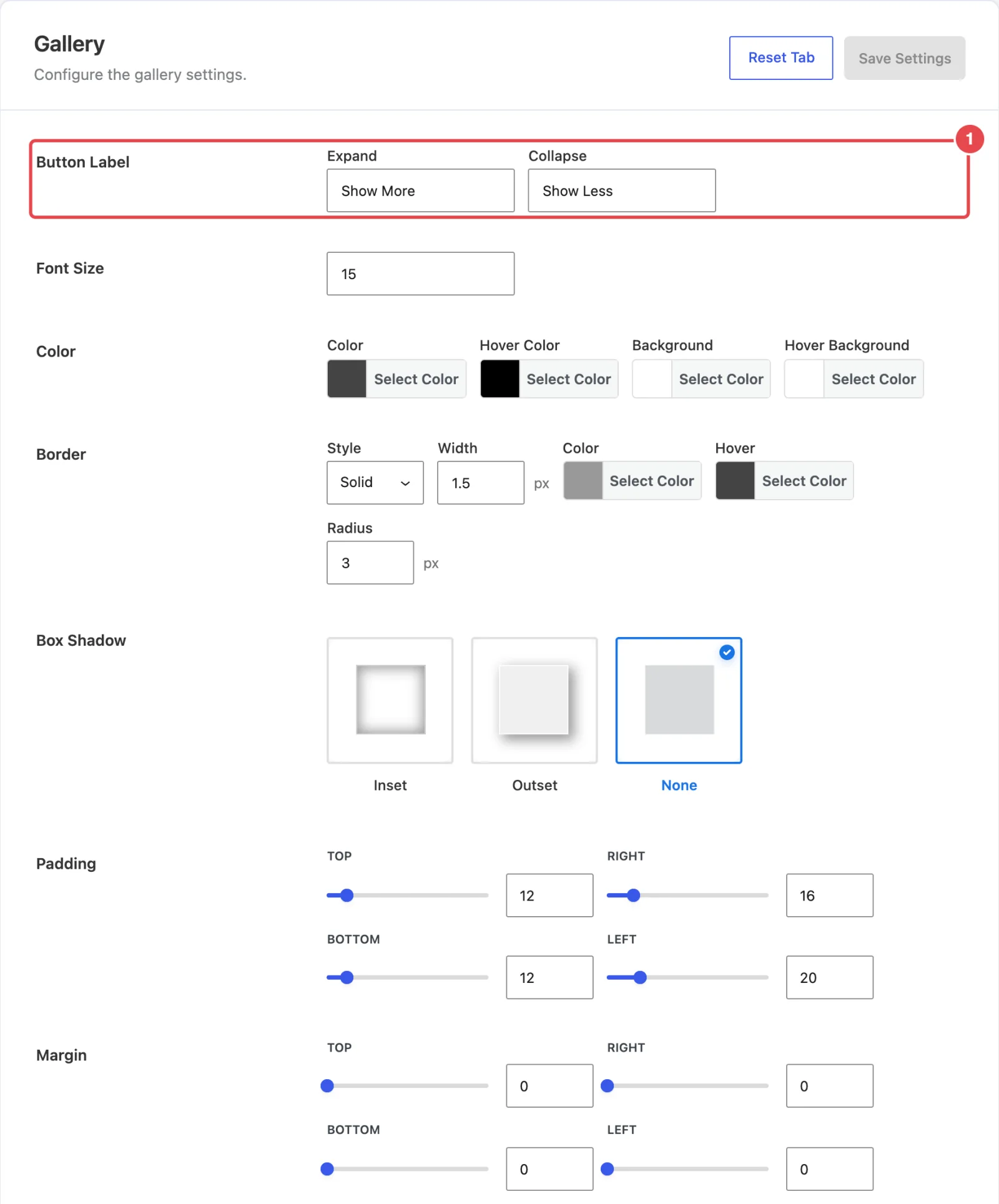
Button label
| Setting | What it does | Default |
|---|---|---|
| Button Label | Two text boxes. Expand is the label before the hidden images are shown, and Collapse is the label once they are. Write whatever suits your store, such as "See all photos" or "Fewer photos". | Show More / Show Less |
Button style
| Setting | What it does | Default |
|---|---|---|
| Font Size | The label size in pixels. | 15 |
| Color | Color (text), Hover Color, Background and Hover Background. | #444444, #000000, #ffffff, #ffffff |
| Border | Style (None, Solid, Dashed, Dotted or Double), Width (px), Color, Hover color and corner Radius (px). | Solid, 1.5px, #999999, hover #444444, radius 3 |
| Box Shadow | A soft shadow: Inset (inside the button), Outset (around it) or None. | None |
| Padding | Space inside the button around the label: Top, Right, Bottom, Left (px). | 12 / 16 / 12 / 20 |
| Margin | Space outside the button: Top, Right, Bottom, Left (px). | 0 / 0 / 0 / 0 |
Match your theme's buttons
The defaults give a neutral outlined button. To match your store, copy the colors and corner radius from your theme's Add to Cart button. Shoppers will recognize it as something they can click.
In the free plugin
The free Smart Product Gallery for FluentCart doesn't include the grid layouts, so this sub-tab never appears there.
Where to go next
- General → Grid options: Columns, Visible Gallery Items and Gallery Expansion.
- Tutorial: Grid with Show More: set up a Tiles grid with a Show More button, step by step.
- Tiles: the simplest grid layout.